Tuesday, 28 May 2013

Writing to Improve Your Skills


Guest author today is Karina Fabian, who has taken the time to write a special post for Slow and Steady Writers and to visit us on her book tour. 

Winner of the 2010 INDIE for best Fantasy (Magic, Mensa and Mayhem), Karina  has imagination that takes quirky twists that keep her--and her fans--amused.

Nuns working in space, a down-and-out Faerie dragon, zombie exterminators—there’s always a surprise in her worlds. 

Mrs. Fabian teaches writing and book marketing seminars, but mostly is concerned with supporting her husband, Rob Fabian as he makes the exciting leap from military officer to civilian executive, getting her kids through high school and college, and surviving daily circuit torture…er, circuit training.  Read about her adventures at http://fabianspace.com.  

And please leave a comment below for a chance to win a free electronic copy of Greater Treasures

Writing to Improve Your Skills


By Karina Fabian


If you are not rejected at least three times a week, you aren’t really trying.

I used to have a fortune cookie paper with that on it taped to my computer screen.  Nowadays, I’m not really trying, not by that definition, anyway.  I’ve been sticking with a couple of paying gigs, and writing novels and stories for opportunities that catch my eye, which means I’m not submitting very often. 


However, when writing, that maxim holds that to succeed, you must produce and submit.  Whatever genre or venue you choose—science fiction novels to business articles—you can only succeed if you try.

In addition, you want to be smart about your work if you want to grow.  Hope Clark has a fantastic rubric in her book, The Shy Writer.  (http://www.amazon.com/THE-SHY-WRITER-Introverts-Writing/dp/1591135834). I don’t remember the exact details, but it goes something like this:

25% easy writing:  Stuff you know you can sell, stuff you do for fun, stuff you do for free and can write in your sleep

50% writing with some challenge:  You’ll have to find the market, use your imagination, stretch your skills.  It’s writing that takes a little work.

25% aim high:  Write for the magazine or publisher you might not be ready for, something that challenges your skills.  The longshot stuff.  Eventually, you’ll start reaching some of these, and your skill will grow as you push for them.

When Hope mentioned this in a guest chat, I decided to see how that worked in my world.  Here’s what I came up with:

Easy: blogs and self-publishing stories that I love but have not found a home for.  Greater Treasures is the first in the self-publishing venture.  Also the articles I write for Community Entrepreneurs.  (I’ve done business features for decades now.)

Medium challenge: Anthologies that catch my eye, stories or articles that go outside my usual genre.  Sometimes, the opportunity might come to me, but the challenge is to be worthy of it.  Also, the current novel I’m writing, which has a publisher waiting.

Aim High: I have two novels I believe are worthy of the big traditional publishers and which I’ll keep shopping for several years before giving up on them.  I have a couple of other novels in mind to write.  Not sure if they will be aim high or medium challenge yet.
I probably need more in the aim high category, but with the rest of my life challenging me as it is, I’m content to wait.  Your proportions might vary as well, but always strive to have something in each category.

Remember, too, that to succeed in writing, you must also submit.  Send out your works.  Take the chance. Accept rejection, learn from it if you can and keep on.  Whether it’s three times a week or once a year, success depends on producing and submitting.


* * * *
About Greater Treasures:  Most people associate the DragonEye stories with high humor ranging from puns to slapstick, and in fact, the first stories and the novels have certainly been crazy fun.  But the life of a cynical dragon PI isn’t all laughs, and Vern has had a few chilling stories to tell me.  Some of these, I’ve sold to anthologies, but some are too long for that.  Thus, I’ve decided to start publishing them on my own. 

One thing I like to do for DragonEye stories is watch old noir films.  Greater Treasures came to me while watching the Maltese Falcon.  If you’ve never seen it, I recommend it.  (Then, reread the story to see if you catch the in jokes.)  I needed something with more “oomph” than a bird statue, and since Vern has some history with the Lance of Longinus, it made a good fit.  I enjoyed looking up all the conspiracy theories about the use of the Lance by Hitler, which is where the neo-Nazi angle came in.  To say more would be spoilers, so please, enjoy the story.
And if you do, be sure to check out Vern’s other tales at http://dragoneyepi.net.

Thanks Karina for all the information and advice. So glad you could visit us today.


And thanks for the chance to win an e-copy of Greater Treasures by leaving a comment below.

Monday, 22 April 2013

How to Create A Meme


I started to write this on April 1 and realized it was the next best thing to an April Fool joke. The ambitious title promises help in creating a meme--a tall order since the definition of a meme is still fluid and transforming  through usage as a computer term.

The precedent is already set. Icons morphed from being religious images of saints and the Holy Family, usually painted on wood, into being pictorial symbols for computer files in the late twentieth century. Now journalists use the word wholesale to tag any celebrity or charismatic politician.

The word meme is relatively new but since its appearance just thirty years ago to denote a cultural imperative passed wordlessly through generations, it has changed to refer to any picture of image which catches global attention.


Now it's an image or video that goes viral on the Internet--usually humorous and/or political. Sharing across social networking sites and through emails makes it easy to attract world-wide interest.

Creating the image is the easy part. Creating the true viral meme is in the lap of the gods.

How to Create Your Meme

1. Decide what you want it to do: promote a book or a service, share a worthwhile quote, make a statement about life.
    Have a look at one choice for the twenty-five best memes of all time.
    Warning: this could be a time waster.

2. Check out the many meme generators online--another time-fill for those of us happily procrastinating out there.

A review of the best meme generators is a useful starting place if you want an off-the-peg solution.
     Or: check out piZap.
     Warning: lots of ads but it is an amazing free photo editor. 
Select edit photo and you will find a meme option which allows you to add text top and bottom meme-style. You can also create photo collages and FB timeline covers.

3. Choose your own image to suit your purpose.
    Warning: Remember laws of copyright apply
You need to use your own photograph or choose one that has a licence to allow its adaptation as a meme. If using your book cover for promo purposes, make sure the meme text is memorable not just a buy me shout.


Useful software

Unless you already have photo editing software, try Paint, more features than the Microsoft version, or PowerPoint, or Gimp.
You can use a plain background for quotations
Just fill the box with the color of your choice.
Add text or text and photo and job done.

If you're using Powerpoint. select a size, add image, caption and off you go.

Related text
Writers on the Move: Memes and Themes

Let me know how you get on and send me a link to your meme. Hopefully we can create a mini meme gallery here to showcase them. Have fun.

Monday, 15 April 2013

Turn Your Stories into Videos--The Easy Way


I love technology and new ideas for marketing and displaying writing creativity And I'm doubly delighted today to present my guest blogger Dr.John Yeoman of Writers' Village.

It's a wonderful site for writers packed with information and hosting excellent and helpful writing competitions as you are always promised a helpful critique of your story.

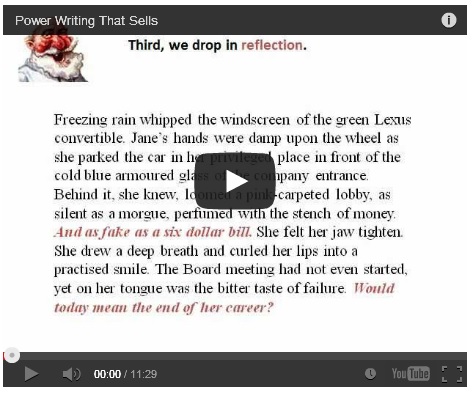
His learning curve in creating the You Tube video on Power Writing that Sells provides a useful step by step guide for simply turning our stories into video.

Do please comment below with your own thoughts, suggestions and ideas.

How To Turn Your Stories Into Videos  The Easy Way

A guest post by Dr John Yeoman

photo from Robgowman, Wikimedia Commons

Have you ever thought of turning your stories or 
poems into videos? True, you could read them aloud 
and podcast them. But a video lets you add graphics, 
backdrops, animation and much else, as well as voice 
and music. 

Your stories glow. The problem is, how can you produce your own quality video and post it at YouTube without a great deal of technical knowledge?

The answer may surprise you. Use Powerpoint! 

I’ve been using Powerpoint for years when teaching 
my university classes in creative writing. Powerpoint 
helps me illustrate texts, animate them and add music 
clips or background narration. It brings my classes 
alive! Powerpoint is also simple to learn, if you have a 
good manual beside you. (I recommend Powerpoint 
for Dummies.) 

So when I wanted to create a ‘class’ in story writing 
techniques as an automated presentation in my web 
site, I thought of Powerpoint. I’m utterly non-technical 
so it took a lot of experimentation but finally I 
produced a video - Power Writing That Sells - that 
attracted more than 480 views on YouTube in its first 
three days.

It’s not slick but it works. Here’s how you can do the 
same for a story, poem or any sort of text whatever 
that you’d like to transfer to a video.

First, I created a presentation in Powerpoint, using 
just a few simple graphics. I animated the sections, so 
they dissolved or flew in at the click of a mouse. Then 
I added a voice-over and manually advanced the 
sections at each step as I recorded my voice. (That’s 
difficult to describe but any good Powerpoint manual 
will show you how to automate a presentation with a 
voice-over.) 

Now I had a ppt show that would play automatically at 
the click of a button. But I still faced a challenge. How 
could I get it up on the web for public view? First, I 
tried Slideshare. That proved to be useless for 
my purposes, because it does not support voice-
overs for Powerpoint (although you can upload videos 
to Slideshare). Then I stumbled on Prezi, a new 
rival to Powerpoint that lets you make beautiful 
presentations. But again you can’t add voice-overs. 

I realised that an automated Powerpoint presentation 
will not, by itself, work acceptably on the web. 

Powerpoint slide for Power Writing that Sells
I first had to turn the ppt into a video. I needed a 
conversion program. What did I use? I tried 
Wondershare then Moyea. Both of them 
seem to be identical, except that Moyea accepts 
PayPal and Wondershare doesn't. 

So I paid Moyea around $40, downloaded the software and found the conversion from ppt to video was simple. Even for 
somebody who’s not technical.

But I still had the same problem. How could I post my 
video on the web? Metacafe offered me a free platform,
but it inserted 20 seconds of ghastly advertising at the start
of my video, totally wrecking it. 

Of course, YouTube was the answer. I uploaded the 
video and stumbled around the site until I found the 
Video Manager section at YouTube, plus my video 
URL. I plugged the code into my website. (Every 
platform has a different way to do that.) 

Lo, it worked! That said, the video didn't appear at 
YouTube quite the way I wanted. Nor can viewers click 
directly on the hyperlinks within my video. (I know it 
can be done but I haven’t yet discovered how.) 

For me, producing my first video was a painful 
learning curve but the process, once learnt, is simple. 

My next step is to bypass Powerpoint and produce a 
video of one of my live classes in creative writing. 
Could somebody please lend me a copy of Video 
Making for Dummies?


Dr John Yeoman, PhD Creative Writing, judges the Writers’ Village story competition and is a tutor in creative writing at a UK university. 

He has been a successful commercial author for 42 years. You can find a wealth of ideas for writing stories that sell in his 

free 14-part course at Writers’ Village:
http://www.writers-village.org/writing-award-tips

Links

Slideshare at www.slideshare.net

Prezi at www.prezi.com

Wondershare at www.Wondershare.com

Moyea at www.moyea.com

Metacafe at www.metacafe.com

Writers' Village at www.writers-village.org

And the video that started it all: Power Writing That Sells

coming next week: How to Create a Meme
coming April 29:   How to Create an Infographic